
🚀 Power BI MCP Server – The Future of AI-Powered Business Intelligence
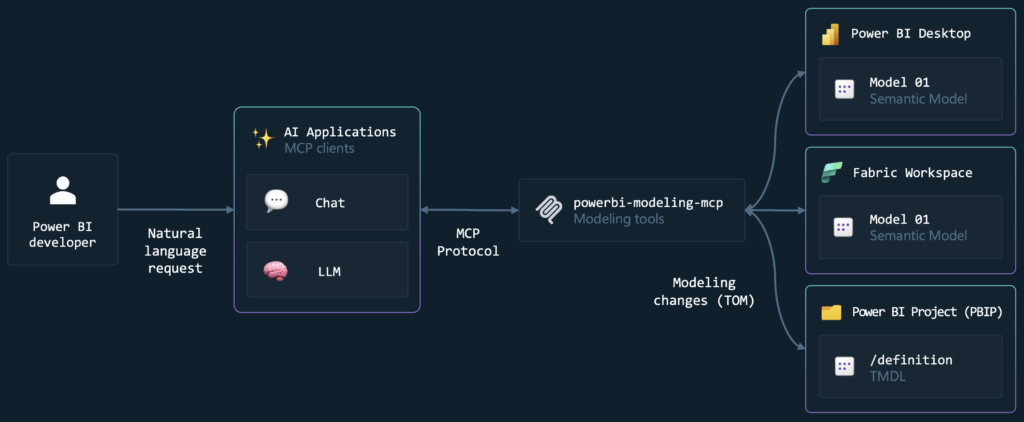
Welcome to the most complete resource on Power BI MCP Server integration.
On this page, I share everything about:
- MCP Server setup for Power BI
- Claude AI integration
- IDE connections
- GitHub workflows
- Automated development pipelines
- AI-assisted DAX & modeling
- Enterprise deployment strategies
If you want to combine Power BI + AI + Developer Workflows, this is your complete guide.
🔷 What Is Power BI MCP Server?
Power BI MCP Server enables structured communication between AI systems and Power BI environments using the Model Context Protocol (MCP).
It allows:
- AI agents (like Claude) to interact with Power BI models
- Structured metadata exchange
- Secure model access
- Intelligent report automation
- Developer-first integration workflows
This opens a new era of AI-powered business intelligence.
🔷 What You’ll Learn Here
On this page and linked articles, I will cover:
🔹 MCP Server Architecture
- How MCP works
- How Power BI integrates
- Security layers
- Authentication flow
🔹 Claude + Power BI Integration
- Connecting Claude to MCP server
- AI-assisted DAX writing
- AI-generated measure optimization
- Report structure suggestions
🔹 IDE Integration
- VS Code connection
- GitHub repository integration
- Version control for Power BI
- Deployment automation
🔹 Power BI + GitHub Workflow
- PBIX version management
- Semantic model versioning
- CI/CD pipelines
- Dev → Test → Prod environments
🔹 Enterprise MCP Setup
- Authentication strategies
- API security
- Token handling
- Role-based access